
Email Trigger Feature
The Email Trigger feature allows you to automatically start campaigns by sending emails to a special campaign email address. This is particularly useful for processing job applications and resumes.
Accessing the Email Trigger
To access the Email Trigger settings:
- Navigate to your campaign details page
- Click on the Sources tab in the main navigation
- Select Email from the vertical menu on the left side
The Sources tab organizes all trigger methods (Email, API, and Integrations) in one convenient location with easy-to-navigate vertical tabs.
Note: A UI screenshot showing the Email Trigger interface is available and will be added to this documentation.
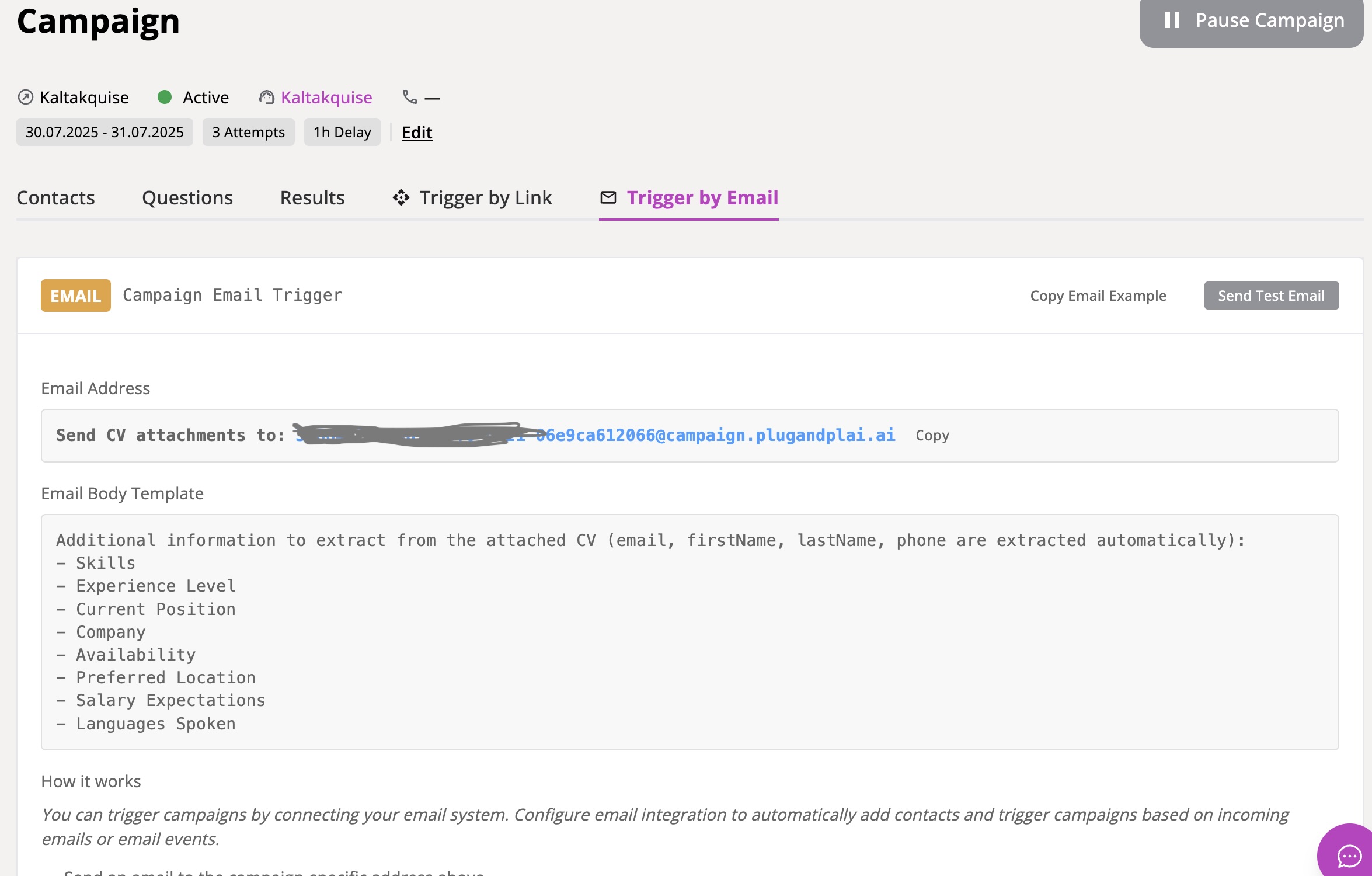
How Email Triggering Works
Get the Campaign Email Address:
- Each campaign has a unique email address:
[campaign-id]@campaign.plugandplai.ai - Copy this address from the Email Trigger tab in your campaign.
- Each campaign has a unique email address:
Send CV and Information:
- Send an email to the campaign address
- Attach the candidate's CV or resume as a PDF
- Include information you want extracted in the email body
Automatic Processing:
- The system automatically processes the CV
- Extracts contact information (email, name, phone)
- Adds the contact to your campaign
- Schedules the automated call
Email Body Template
When sending emails to trigger campaigns, include information like:
- Skills to look for
- Experience level requirements
- Current position details
- Company information
- Availability preferences
- Location preferences
- Salary expectations
- Languages spoken
Test Email Feature
Before using the email trigger in production:
- Go to the Email Trigger tab in your campaign
- Click Send Test Email
- Enter your email content
- Attach sample files if needed
- Send the test to verify everything works correctly
Best Practices for Email Triggers
- Use clear email content: Specify exactly what information to extract
- Attach CVs as PDFs: The system works best with PDF format
- Test before production: Always send test emails first
- Monitor results: Check that contacts are added correctly to your campaigns
For further assistance, refer to the in-app help or contact support.